


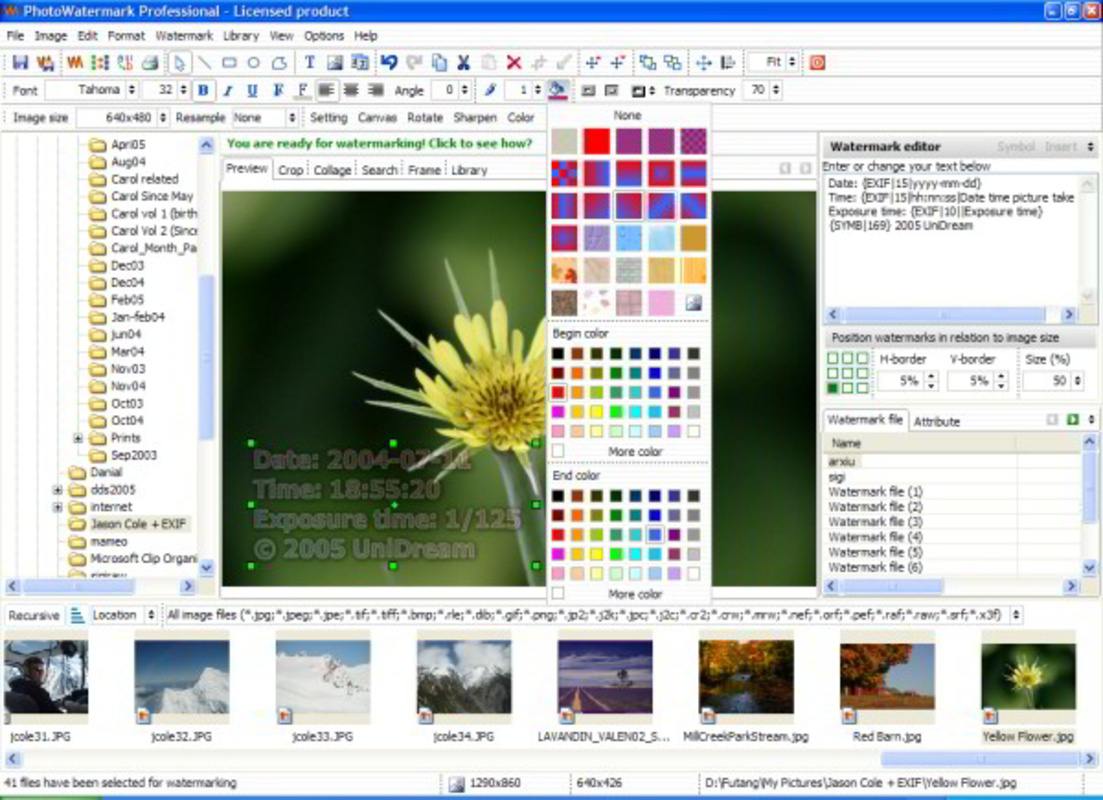
Description
Download UniDream Photo Watermark PRO – Photo Watermark, Image Protection, Add Watermark to Photo
Overview
UniDream Photo Watermark PRO is a specialized mobile application designed for photographers, content creators, and leisure travelers seeking to safeguard their visual content. The app serves as a dedicated tool for adding both text and image-based watermarks to photos, ensuring that personal branding or cherished memories remain associated with each image. By embedding watermarks directly into photo files, the app helps prevent unauthorized use and preserves the integrity of digital work. Its primary function is to provide users with a reliable method to assert ownership over their images, particularly in public or shared digital environments.
Target users include amateur and professional photographers who frequently share images online, as well as individuals who document personal journeys and want to preserve the context of their memories. The app’s focus on customization and batch processing makes it suitable for users managing large photo libraries. While the developer, UniDream, is listed, no additional background on the company or its broader product portfolio was provided. The app operates within the photography category, filling a niche need in the mobile content protection ecosystem. Real-world use cases include protecting stock images, securing social media posts, or marking travel photos with personal identifiers.
Despite the absence of detailed performance or technical specifications, the app’s continued presence in the market since its release in 2007 suggests a stable and functional design. Its enduring relevance highlights its value in a digital landscape where image theft and misattribution remain persistent concerns. The app contributes meaningfully to digital asset management by offering a straightforward, dedicated solution for image protection on mobile devices.
Key Features & Functionality
- Custom Watermark Options: Users can create personalized watermarks using either text or image inputs. This allows for the integration of logos, signatures, or custom graphics that reflect personal or brand identity, ensuring each photo carries a unique mark of ownership.
- Batch Processing Capability: The app supports the simultaneous application of watermarks to multiple photos, streamlining workflows for users managing large volumes of images. This feature is especially beneficial for professionals who need consistent branding across hundreds of files.
- Transparency Adjustment Tool: A dedicated tool enables gradual adjustment of watermark opacity, allowing users to balance visibility and aesthetics. This ensures that the watermark remains noticeable without overwhelming the original image content.
- Save Custom Watermarks: Users can store multiple customized watermark designs for future use. This functionality enhances efficiency, particularly for those who update branding elements or use different watermarks for various projects.
- User-Friendly Interface: The app features an intuitive layout with straightforward navigation, enabling users of all experience levels to apply and customize watermarks without requiring training or technical knowledge.
For example, a travel photographer might use the batch processing feature to watermark dozens of vacation photos with a semi-transparent logo, ensuring that their work remains traceable. Similarly, a freelance designer could save a branded watermark with their company name and logo for consistent use across client projects. These features collectively enhance the app’s utility by combining protection with creative control.
Interface, UX & Performance
UniDream Photo Watermark PRO presents a clean and organized interface, optimized for mobile use. The layout prioritizes accessibility, with clearly labeled buttons and logical navigation paths that guide users through the watermark creation and application process. Visual elements are minimal yet effective, focusing on functionality without clutter. The app’s design supports quick access to core features, such as selecting images, choosing watermark types, and adjusting settings.
Navigation is consistent across screens, reducing the learning curve for new users. The ability to preview watermark placement before finalizing ensures that users can fine-tune positioning and transparency with confidence. Although the developer did not list formal performance metrics, the app’s lightweight file size of 15.6 MB suggests efficient resource usage. This likely contributes to smooth operation across a range of Android devices, including mid-tier and older models.
Responsiveness is generally reliable, with minimal lag during image loading and watermark application. Stability appears to be maintained, particularly given the app’s long-standing presence in the market. However, specific requirements for device compatibility or performance thresholds were not disclosed. Users should expect consistent behavior during standard use, though results may vary depending on individual device capabilities.
Platform Compatibility & Technical Requirements
UniDream Photo Watermark PRO is available exclusively on the Android platform. The current version is 2.1.1, with a file size of 15.6 MB, indicating a lightweight installation. This makes the app suitable for devices with limited storage space or older hardware. The developer did not specify minimum OS requirements or device compatibility details, so users should verify functionality on their specific device models.
While the app’s age suggests it may support older Android versions, no explicit information was provided regarding backward compatibility. Users are advised to check their device’s operating system version and ensure it meets the app’s potential requirements. The absence of iOS availability limits access to non-Android users, though the app remains a viable option for Android-based photographers and content creators.
Pros and Cons
Pros
- Supports both text and image-based watermarks for maximum customization.
- Batch processing enables efficient handling of multiple photos.
- Transparency adjustment allows for balanced visibility and aesthetics.
- Custom watermarks can be saved for repeated use, improving workflow efficiency.
- Intuitive interface suitable for users of all skill levels.
Cons
- Platform availability limited to Android; no iOS version was listed.
- Specific system requirements and compatibility details were not disclosed.
- Price point of $4.99 may be considered high for a niche utility app.
- No built-in sharing or export options were mentioned.
- Limited information on update frequency or long-term support.
FAQ
Is UniDream Photo Watermark PRO available for iOS?
The developer did not indicate iOS compatibility. The app is currently available only on the Android platform.
Can I use my logo as a watermark?
Yes, the app allows users to upload image files as watermarks, including logos, signatures, or custom graphics.
Does the app support bulk editing of photos?
Yes, UniDream Photo Watermark PRO includes batch processing, enabling users to apply watermarks to multiple images at once.
How do I adjust the visibility of my watermark?
The app features a transparency adjustment tool that allows users to control the opacity of the watermark for optimal visibility.
Is the app secure and safe to install?
As a mobile app from a known developer, UniDream Photo Watermark PRO is designed to operate within standard Android security protocols. Users should download from official sources to ensure authenticity.
Final Thoughts + CTA
UniDream Photo Watermark PRO stands out as a focused, efficient solution for protecting digital images on Android devices. Its core strengths—customizable watermarks, batch processing, and intuitive design—make it a valuable asset for photographers and travelers who prioritize image ownership and branding. While the lack of iOS support and limited technical details may deter some users, the app delivers consistent performance and clear functionality for its target audience.
For those seeking a reliable, no-frills tool to safeguard their visual content, this app offers a practical and effective approach. The ability to save custom watermarks and adjust transparency enhances both creativity and control. Despite its modest price, the app’s long-standing presence and dedicated feature set justify its value for users who frequently share or publish photos.
Download UniDream Photo Watermark PRO now
Guides & Tutorials for UniDream Photo Watermark PRO
How to install UniDream Photo Watermark PRO
- Click the Preview / Download button above.
- Once redirected, accept the terms and click Install.
- Wait for the UniDream Photo Watermark PRO download to finish on your device.
How to use UniDream Photo Watermark PRO
This software is primarily used for its core features described above. Open the app after installation to explore its capabilities.
User Reviews for UniDream Photo Watermark PRO 0
No reviews found


